Cookieless Session Tracking: How Sessions Are Counted

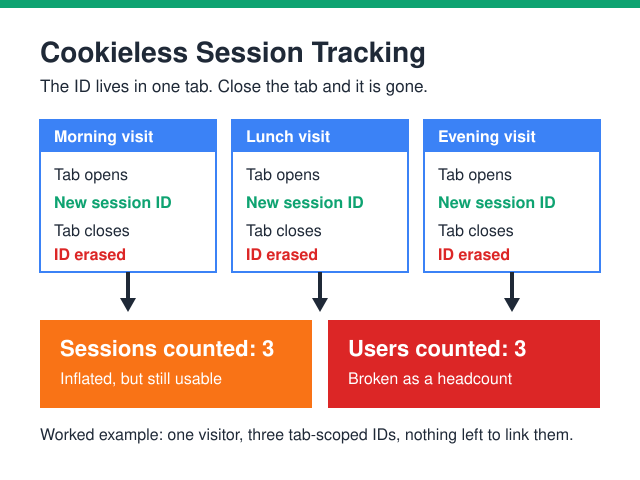
Cookieless session tracking counts visits, not people. With no cookie to hold a long-lived identifier, your analytics tool falls back on something short-lived. That is usually an ID in the browser tab’s own storage, or a token issued by your server. The ID disappears when the tab closes. Then add the usual inactivity timeout, which defaults to 30 minutes in Google Analytics 4. One person can now produce several sessions in a single day.
So your session count climbs. Your “users” number climbs with it, until the two are nearly identical. That is not a broken counter — the unit of measurement changed. Below you will find how a cookieless ID gets assigned. You will also see which numbers survive, which ones inflate, and which ones break for good. And you will see what still belongs in a report.
What Is a Cookieless Session?
A cookieless session is a group of interactions tied together by one short-lived identifier. In cookieless session tracking, that identifier usually lives in sessionStorage. The HTML Standard calls it storage “for scenarios where the user is carrying out a single transaction.”
The lifespan is short on purpose. MDN’s reference on sessionStorage says the data “is only kept for the duration of the page session.” It adds that “closing the tab/window ends the session and clears the data.” A reload is different, though. Session storage survives page reloads, so a refresh will not split a visit in two.
Scope matters as much as lifespan. MDN notes that sessionStorage “is partitioned by both origin and browser tabs.” A second tab therefore gets a completely fresh storage area. The HTML Standard adds that each window gets “its own individual copy of the session storage object.”
Compare that with the old cookie model. A first-party cookie could sit on the device long after the visit that created it, quietly stitching visits together across tabs, days and campaigns — though browsers trim that far shorter than the expiry date suggests, which is the whole subject of how long analytics cookies survive. (What makes a cookie first-party rather than third-party in the first place — and why Safari and Firefox treat the two so differently — is explained separately.) Remove the cookie and the stitching thread is gone — not the measurement, just the thread.
Why Do Session Counts Jump When Cookies Disappear?
Because cookieless session tracking restarts far more often than people expect. Four ordinary things now each begin a brand-new session instead of continuing an old one.
- Closing the tab. The identifier goes with it, so the next visit starts from zero.
- Sitting idle. After the inactivity timeout expires, the tool closes the session and opens a new one.
- Hopping between subdomains. Storage is partitioned by origin, so
shop.example.comandwww.example.comdo not share a tab-level ID. - Returning from an external app. A link from an email client or social app often lands in a fresh tab. Fresh tab, fresh identifier.
Here is the everyday version, as a worked example rather than a measurement. Someone reads your pricing page over coffee and closes the tab. They open it again at lunch, then once more in the evening, all in the same browser on the same laptop. A first-party cookie would have tied those three visits to one returning person. Without one, it is three sessions and three “users” — from one human being.
Multiply that across your whole audience and the arithmetic explains the dashboard. Sessions rise. Users rise faster, because every new session drags a new “user” along with it. Average session duration usually dips, since visits get chopped into smaller pieces. None of that requires a bug.
Which Metrics Survive Cookieless Session Tracking?
The useful move is to sort your metrics into three buckets. Do it before anyone asks awkward questions in a meeting. Some numbers keep working exactly as before. Some grow for purely mechanical reasons. A few stop meaning what their label says.
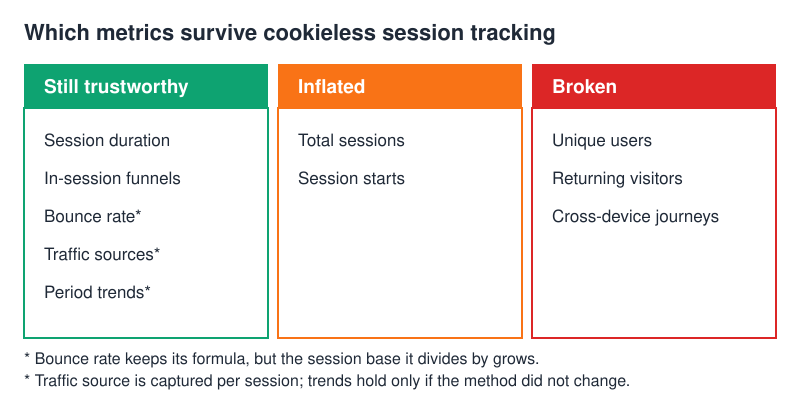
| Metric | Trust it? | What happens without cookies |
|---|---|---|
| Sessions | Inflated | A new ID per tab, plus a new one after every timeout, so one visitor can create several |
| Unique users | Broken | With no persistent ID, the count drifts toward the session count |
| Returning visitors | Broken | Nothing is left on the device to recognise on the next visit |
| Cross-device journeys | Broken | Phone and laptop share no identifier, so the path cannot be joined |
| Session duration | Yes | Timestamps inside a single session are still accurate |
| In-session funnels | Yes | Every step happens under the same session ID |
| Bounce rate | Yes, with care | The formula holds, but the session base it divides by is larger |
| Traffic sources | Yes, per session | Referrer and campaign values arrive with the first hit of each session |
Bounce rate deserves a footnote. The ratio itself stays honest. The denominator has grown, though, so a year-on-year comparison across the switch is misleading. Our guide to bounce rate and how to read it walks through the formula in detail.
How Is a Session Identified Without Cookies?
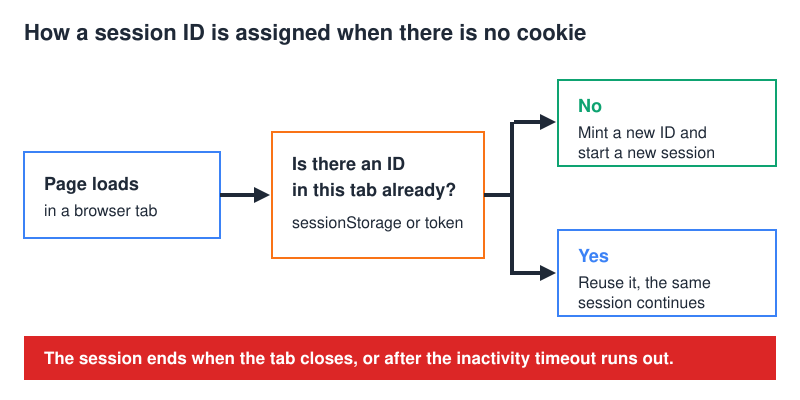
Cookieless session tracking uses one of three approaches in practice. Only two of them are worth your time.
1. A sessionStorage ID
On the first page load, your script checks the tab’s storage for an ID. If none exists, it generates a random one and records the start of a session. Every later hit in that tab carries the same value. Simple, cheap, and no server work required. The catch is the scope: one tab, one ID.
2. A server-side session token
Here your own backend issues the identifier and attaches it to the response. That gives you more control over how long a session lives. It also keeps the logic away from ad blockers. Even so, it remains a visit-scoped token. It will not recognise the same person tomorrow. For that you need durable storage, which puts you back into consent territory. Our explainer on server-side tracking and why it is growing covers the setup side.
3. Fingerprinting (skip this one)
Stitching sessions from an IP address plus a user-agent string looks tempting. It is noisy in practice. An office, a household or a mobile carrier can hand the same IP to many people at once. Identical devices also produce identical user-agent strings. The legal picture is no friendlier, as the next section explains.
Event design sits one layer below all of this. Need the event schema, the QA checks or the implementation patterns? They live in our longer guide to cookieless event tracking.
What Session Timeout Should You Use?
Thirty minutes is the value Google Analytics 4 ships with. Google’s documentation states that “by default, a session ends (times out) after 30 minutes of user inactivity”, and that “the maximum value for ‘Adjust session timeout’ is 7 hours and 55 minutes.” Google also notes that when a session starts it “generates a session ID (ga_session_id).” That is exactly the piece cookieless session tracking has to recreate for itself.
Consider a longer window when visits are naturally slow. Multi-step application forms, long-read articles and B2B research all qualify. Someone opens a tab, takes a call, and comes back long after the default window has closed. A shorter window suits kiosks, shared terminals and public computers. There, a stale session can merge two different people into one visit.
One rule matters more than the number you pick. A longer window groups more hits into one session. Session counts fall and average duration rises, even though nobody changed their behaviour. Therefore, annotate the date whenever you adjust the setting. Never compare a period before the change with a period after it.
Do Cookieless Sessions Still Need Consent?
Dropping the cookie does not automatically drop the obligation. Cookieless session tracking still belongs in your consent review. The European Data Protection Board covered this in its Guidelines 2/2023 on the technical scope of Article 5(3) of the ePrivacy Directive. Version 2.0 was adopted on 7 October 2024. The guidelines discuss browsers that handle information “such as cookies, local storage, WebSQL.” Once “this information or any derivation of this information is accessed, Article 5(3) ePD would apply.”
The same document covers the shortcuts people reach for when cookies vanish. It says fingerprinting and the tracking of resource identifiers “can lead to the application of Article 5(3) ePD.” A separate section deals with tracking based on IP only. There the EDPB says the rule “could apply” even when a different entity triggered the IP disclosure.
To be fair, the guidelines also add nuance. The EDPB notes that applicability “does not systematically mean that consent needs to be collected.” An exemption may apply, case by case. That assessment is a job for your DPO or legal counsel, not for a blog post. Our plain-English guide to GDPR and web tracking is a reasonable place to start that conversation.
What Cookieless Session Tracking Can Honestly Report
Three areas stay solid. Everything inside a single session still holds together, so funnels, step drop-offs and on-page engagement remain reliable. Session-scoped conversion rate works too. Say “per session” out loud, rather than quietly implying “per person.” Period-over-period trends also survive, provided the method behind them has not changed.
Two areas do not. Absolute unique-user counts are no longer a headcount. Returning-visitor rate measures almost nothing, because nothing is left on the device to return with. Pull both out of executive summaries, rather than explaining them away every month.
A few habits make the difference in practice:
- Rename the tile. “Users” becomes “Sessions,” and nobody misreads it again.
- Label anything user-based as directional, on the dashboard itself, not in a footnote.
- Annotate the date your measurement method changed, so future comparisons carry a warning.
- Report conversion rate per session and revenue per session, which need no identity at all.
Common Questions About Cookieless Sessions
Does a cookieless session end when I close the tab?
Yes, if the identifier lives in sessionStorage. MDN states that closing the tab or window “ends the session and clears the data.” Reopening your site afterwards starts a fresh session with a fresh ID. A reload, on the other hand, keeps the same session going.
Why are my users and sessions almost the same number?
Because each new session mints a new identifier, and the tool counts each identifier as a user. Under cookieless session tracking the two figures converge by design, because nothing persists between visits. Treat the gap between them as a signal of how much persistent identity you still have. It is not an accuracy score.
Can I still compare this month to last month?
Yes, as long as the measurement method stayed identical across both months. Comparisons break at the moment you switch storage approach or change the session timeout. The counting rules moved, so annotate that date. Then compare only within the periods on either side of it.
Does server-side tracking fix session counting?
It stabilises collection, but it does not restore identity. A server-issued token still covers one visit only. Durable storage would extend it, and that brings the consent question straight back. Server-side helps with reliability and control, not with recognising the same person next week.
Sessions Measure Visits, Not People
That is the whole shift in one line. Cookieless session tracking is doing its job; the label on the counter is out of date. Rebuild the reporting around visits, campaigns and in-session behaviour. The numbers become useful again as soon as the labels match what is actually being counted. Your next question is usually how to instrument the events that fill those sessions. Start with our guide to what you can and cannot measure without cookies.