First-Party vs Third-Party Cookies: Who Sets Them, Who Blocks Them

Alexander Vermeer
Open DevTools on almost any commercial website, go to Application → Cookies, and you will find two kinds of entries: some carry the domain in your address bar, others carry domains you never typed. That is the whole first-party vs third-party cookies distinction, and it is smaller than most explanations make it sound: the two are written, sent and stored the same way. The only difference is where the cookie comes from relative to the page you are on — and that decides whether Safari deletes it, whether Firefox walls it off, and whether your analytics recognises a visitor tomorrow.
One clarification first, because the terms get mixed up constantly. This is about cookies, the small name=value strings a browser stores — a different subject from first-party versus third-party data, which is about who collected information and under what relationship; that split has its own guide on first-party vs third-party data. A first-party cookie can feed third-party data, and a first-party dataset can be built without a single cookie.
What is a first-party cookie?
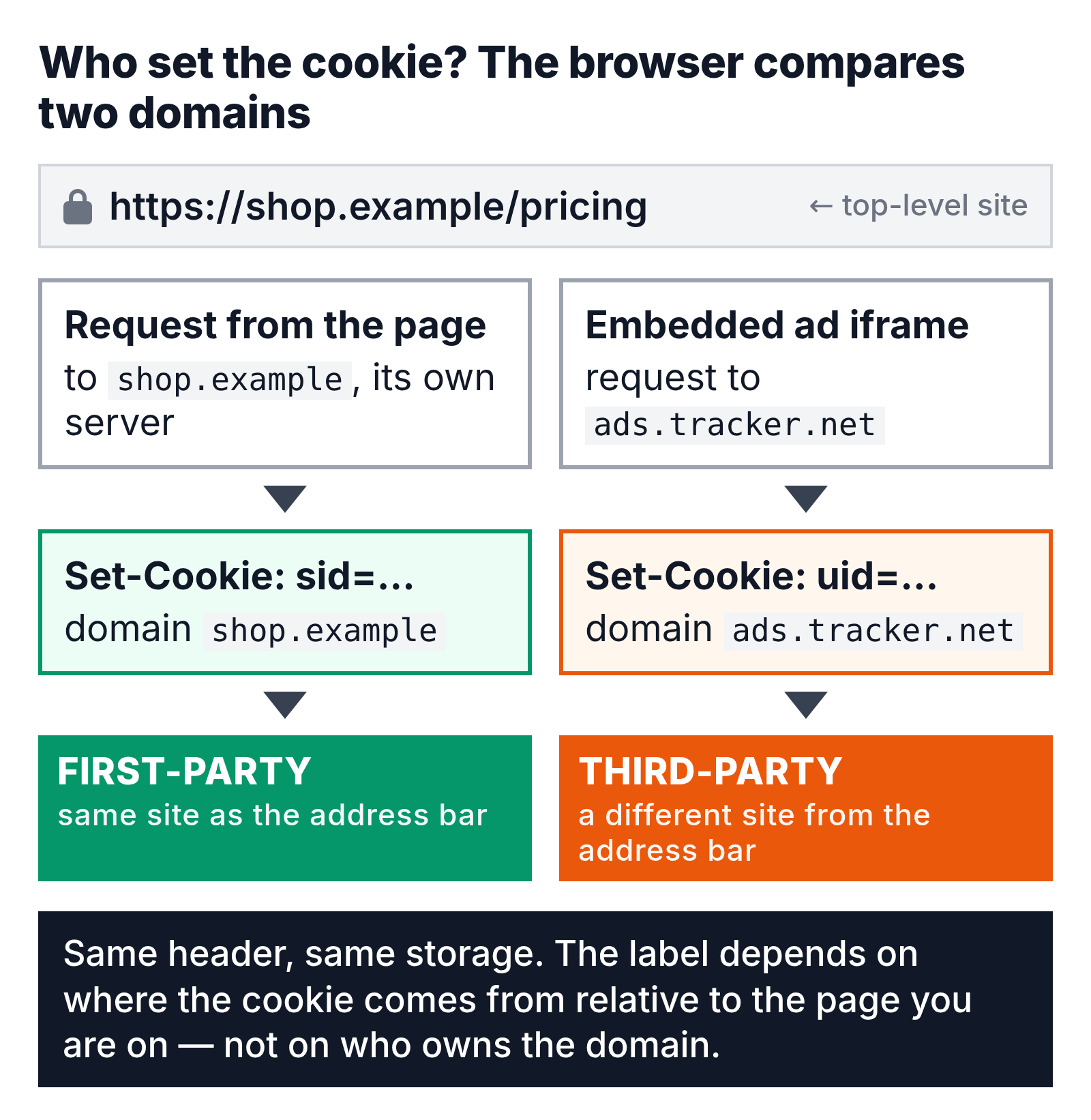
A first-party cookie is a cookie whose domain matches the site shown in the browser’s address bar. If you are on shop.example and a cookie is set for shop.example — by the server in an HTTP response, or by JavaScript running on the page — the browser treats it as first-party and sends it back with every later request to that site.
First-party cookies are what make a website behave like one place rather than a series of unrelated page loads: the login session, the shopping cart that survives a refresh, the language preference you set once. So is the analytics cookie most tools drop on your own domain to recognise a returning browser. Google’s documentation says the GA4 tags “use first-party cookies to distinguish unique users”; the _ga cookie lives on your domain, not on Google’s.
Two details matter more than the name suggests. “Your domain” can include subdomains: a cookie set with Domain=example.com is available on shop.example.com too, while one set without that attribute goes only to the host that set it (MDN’s Set-Cookie reference has the rules). And how the cookie was written matters: one set by your server in a Set-Cookie header and the same one written by a script through document.cookie are both first-party, but Safari caps the script-written one at seven days — see how long analytics cookies survive.
What is a third-party cookie, and how does it work?
A third-party cookie is set by, and sent to, a domain other than the one in the address bar. When shop.example embeds an ad, a video player, a support chat or a social media button hosted elsewhere, that other site’s server can answer with its own Set-Cookie header. Any cookie it sets or reads back is third-party from the browser’s point of view.
Third-party cookie examples are everywhere once you look:
- An ad network’s cookie, set inside an ad slot on a news site and read again on a recipe site, so the same browser is recognised on both — the basis of retargeting.
- A social “Like” button, which loads from the network’s domain and carries its login cookie wherever it appears.
- An embedded map, video or chat widget that uses a cookie to remember state across the sites that embed it.
The mechanism is identical to a first-party cookie. WebKit’s tracking prevention page states that “there is no special kind of cookie that constitutes a third-party cookie”; the label describes the context, not the cookie. That is why your own analytics cookie is first-party on your site and turns third-party the moment your page is loaded inside someone else’s iframe — which is where embedded checkouts and course platforms run into cookie blocking first.
How does the browser decide which is which?
The browser compares two things: the site of the request that carries the cookie, and the site of the top-level page — the URL in the address bar. Same site, first-party; different site, third-party. “Site” means scheme plus registrable domain, so news.example and sub.news.example count as one site, while news.example and adtech.example do not. Who owns the domains plays no part.
That last point trips up a lot of teams. If you run brand.com and a help centre on brand-support.net, cookies from a brand-support.net widget embedded on brand.com are third-party, and Safari blocks them, no matter that both domains are yours. Google’s documentation makes the same point and concludes that “third-party cookies are really cross-site cookies”. You will also see the split written as 1st party vs 3rd party cookies; the meaning is the same.
What the SameSite attribute adds
SameSite is how a server declares when a cookie may travel across sites at all. Strict sends the cookie only with same-site requests; Lax adds top-level navigations such as clicking a link from another site; None sends it everywhere and only works together with Secure. Chromium-based browsers treat a missing attribute as Lax; MDN’s third-party cookies guide advises setting it explicitly because other browsers vary.
That makes SameSite=None; Secure a useful audit signal: a cookie that needs to work cross-site has to say so, and filtering DevTools by that attribute lists exactly the cookies that stop working wherever third-party cookies are blocked or partitioned.
Partitioned cookies: the CHIPS middle path
CHIPS — Cookies Having Independent Partitioned State — lets a third-party cookie exist without becoming a tracking cookie. A cookie set with the Partitioned attribute is stored under two keys: the domain that set it and the top-level site it was set on. A chat widget on shop.example gets one cookie; the same widget on news.example gets a different, unrelated one. Embed state survives; cross-site tracking does not. Chrome has supported it since Chrome 114, and MDN lists CHIPS as Baseline since December 2025, so current versions of the major browsers all handle it.
First-party vs third-party cookies at a glance
The difference between first-party and third-party cookies comes down to one question — whether the cookie’s domain matches the site in the address bar — and everything in the table below follows from the answer.
| First-party cookie | Third-party cookie | |
|---|---|---|
| Set by | The site in the address bar (its server or its scripts) | A different site the page embeds: ad network, widget, pixel |
| Cookie domain | Matches the top-level site (subdomains count as the same site) | Does not match the top-level site |
| Who can read it | That site, on its own pages | The setting domain, from any page that embeds it (unless partitioned) |
| Typical uses | Login session, shopping cart, preferences, site analytics | Targeted advertising, retargeting, cross-site attribution, embed state, social login |
| Lifetime | Up to 400 days in Chrome and Firefox; 7 days in Safari if written by JavaScript | Same caps; usually blocked or partitioned before expiry matters |
| Consent | Required unless strictly necessary (login, cart) | Required — and blocked in Safari regardless |
| Safari | Allowed | Blocked by default (ITP) |
| Firefox | Allowed | Partitioned per top-level site (Total Cookie Protection) |
| Chrome | Allowed | Allowed by default; blocked in Incognito or by user setting |
What are third-party cookies used for?
Third-party cookies exist so that third parties can recognise the same browser on more than one site, and every use follows from that: showing you an ad for the shoes you looked at yesterday, capping how often you see it, crediting a purchase to the ad you clicked a week earlier, keeping you signed in to a comment widget across a publisher network. Not all of it is sinister, but a browser cannot tell a login widget from a tracker by looking at the cookie, so the strict ones blocked the category. Advertising networks felt it first; measurement teams felt it next.
Do second-party cookies exist?
Not in any browser. A browser knows two contexts, same-site and cross-site, and there is no attribute, setting or line in the cookie specification for a third. “Second-party” is a marketing term for first-party data one company shares with a partner under contract. If a vendor offers you second-party cookies, ask which domain sets them; the answer will be first or third.
Where third-party cookies stand in each browser
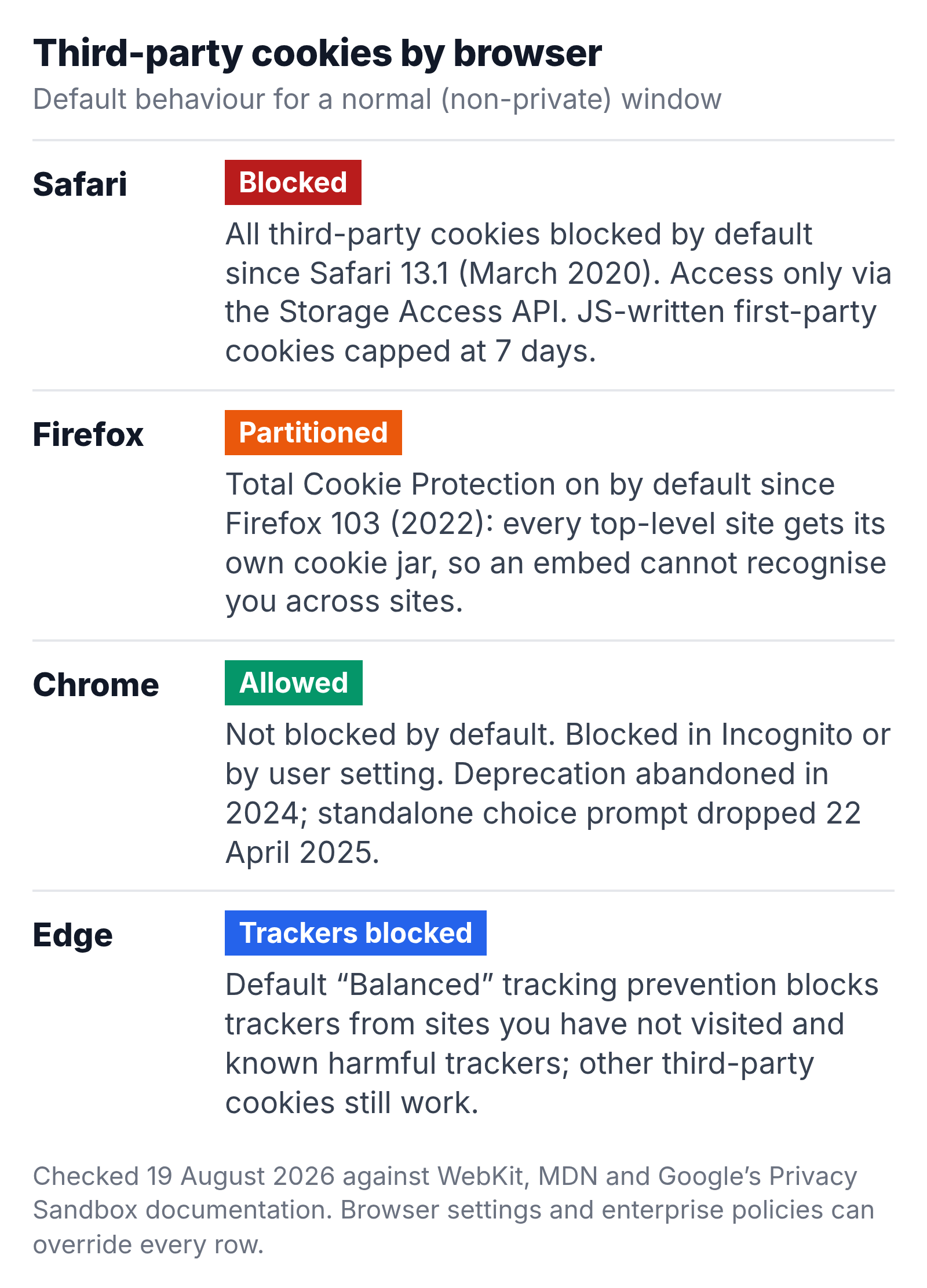
Checked on 19 August 2026 against the vendors’ own documentation. The dates matter, because most “cookie deprecation” articles describe a plan that no longer exists. (Edge sits between the extremes: its default “Balanced” tracking prevention blocks trackers from sites you have not visited and leaves other third-party cookies alone.)
Safari. Intelligent Tracking Prevention has blocked all third-party cookies by default since Safari 13.1 and iOS 13.4, announced on 24 March 2020 as “full third-party cookie blocking”. WebKit’s policy page adds that “there are no exceptions to this blocking”; an embed can only get cookie access by asking through the Storage Access API. ITP also caps JavaScript-written first-party cookies at seven days.
Firefox. Total Cookie Protection takes a different route. Instead of blocking, Firefox double-keys cookies by the setting domain and the top-level site, so an embed still gets a cookie — a different one on every site. MDN’s State Partitioning page dates the default-on rollout to Firefox 103, in 2022; known trackers are blocked outright under Enhanced Tracking Protection.
Chrome. Chrome does not block third-party cookies by default; it blocks them in Incognito and when a user chooses “Block third-party cookies” in settings. After a phase-out announced in 2020 and postponed several times, on 22 April 2025 Google said it would “maintain our current approach to offering users third-party cookie choice in Chrome” and would not roll out a new standalone prompt. On 17 October 2025 it retired most of the ad-related Privacy Sandbox APIs while keeping CHIPS, FedCM and the Storage Access API. The status page dated 14 August 2026 shows the same picture.
Should you allow third-party cookies?
As a user, you lose very little by blocking them. Sites still remember your login and your cart, because those are first-party. What breaks is cross-site convenience — an embedded sign-in widget, a payment iframe, course content shown inside another site — and the browser lets you allow cookies for that one site when it happens.
As a site owner, the question answers itself. Every Safari visitor — every iPhone — already arrives without third-party cookies, and every Firefox visitor with partitioned ones. Design as if they are gone and treat their presence in Chrome as a bonus.
What happens to analytics when third-party cookies are blocked?
Your own analytics keeps working, because your analytics cookie is first-party. What breaks is anything that needed one browser to be recognised across two sites: cross-domain tracking between your site and a checkout on another domain, conversion matching that relied on the ad platform’s cookie, and measurement of your content when it is embedded elsewhere.
The failure mode is quiet. A visitor who moves from brand.com to checkout.partner.com becomes a brand-new user on arrival, so the funnel shows a drop where none happened and the conversion lands in direct traffic. Nothing throws an error; the numbers just lean one way, which is why the browser split is the first thing I check when a funnel looks worse than revenue says.
What teams do about it, in rough order of effort:
- Keep measurement first-party — collect from your own domain, set the identifier server-side where you can, and pass identity between your own domains in the URL rather than expecting a shared cookie.
- Report on sessions and events, not people — they never needed cross-site identity; how sessions are counted without cookies shows what still holds up.
- Design events that stand on their own — the more context each carries, the less you depend on stitching; cookieless event tracking covers what you can and cannot measure without any cookie.
- Gate every tag on consent in one place — a tag manager is where consent state should decide which cookies get set at all.
Are first-party cookies GDPR-safe?
Not automatically. European consent rules attach to storing or reading anything on a person’s device, not to which party did it. A first-party analytics cookie needs the same user consent as a third-party one unless it is strictly necessary — a login session or a shopping cart qualifies, an audience-measurement cookie generally does not. The GDPR and web tracking guide covers what “strictly necessary” means and what a cookie banner has to do to count as valid consent; the CCPA frames it differently, but a first-party cookie feeding a cross-site ad profile still counts as a sale or share.
And many “first-party” cookies are written by third-party code. A vendor’s script on your page can set a cookie on your domain — first-party by the browser’s rules, third-party processing by the regulator’s. Safari’s seven-day cap on script-written cookies exists for exactly that reason. For consent purposes the safer default is to treat first-party and third-party cookies alike, rather than sorting them by domain.
Common questions
Is the Google Analytics cookie first-party or third-party?
First-party: _ga is set on your domain by the tag on your page. Because a script writes it, Safari shortens its two-year expiry to seven days; Chrome and Firefox allow up to 400 days.
Can a first-party cookie still track people across sites?
Yes, through link decoration (an ID in the URL written into a first-party cookie on landing) or CNAME cloaking (a subdomain of your site pointed at a tracker). WebKit answers each with a cap: 24 hours after a decorated link, seven days for a cloaked subdomain.
How do I see which cookies on my site are third-party?
Open DevTools, go to Application → Cookies, and look at the Domain column: anything that is not your site is third-party. Then look for SameSite=None, which marks the cookies that expect to work across sites. To see what breaks without them, Chrome’s chrome://flags/#test-third-party-cookie-phaseout flag makes it behave as if they were blocked.
Are third-party cookies going away in Chrome?
Not on the current plan. Google’s April 2025 statement kept the existing user choice and shelved the standalone prompt; its October 2025 update retired most of the replacement ad APIs. Third-party cookies remain on by default in Chrome, with the setting to block them one click away. Anyone still quoting a Chrome deprecation date is quoting a plan that was withdrawn.
Start with your own cookie jar
Load your busiest page, open the cookie list and sort by domain. Everything not on your domain is a dependency on a browser decision you do not control. Mark the ones with SameSite=None, note which product each belongs to, and ask what report goes wrong when Safari refuses it. Ten minutes of that tells you more about your measurement risk than any article about cookie deprecation, this one included.

Alexander Vermeer
Web analytics specialist with over 8 years of experience implementing tracking solutions for businesses of all sizes. Passionate about helping companies make sense of their data without drowning in complexity. When not debugging GTM containers, you'll find me advocating for privacy-respecting analytics approaches.