What Is a Tag Manager? How It Simplifies Website Tracking

Alexander Vermeer

If you manage a website, you have probably been asked to “add a tracking script” or “install a pixel” at some point. Doing that by hand, over and over, gets messy fast. This is exactly the problem a tag manager was built to solve. It is one of the most practical tools in modern web tracking, and it saves a huge amount of time.
Let’s look at what a tag manager is, how it works, and why so many teams rely on one.
What Is a Tag Manager?
A tag manager is a tool that lets you add, edit, and organize tracking code on your website without editing the site’s source code each time. A “tag” is just a small snippet of code, such as an analytics tracker, an advertising pixel, or a conversion tag.
Instead of pasting each snippet directly into your pages, you install the tag manager once. After that, you manage all your tags from a single dashboard. The tag manager decides which tags to load, and when.
Think of it like a power strip. Rather than running a separate cable from every device back to the wall, you plug everything into one strip and control it from there. The tag manager is that power strip for your tracking code.
How a Tag Manager Works
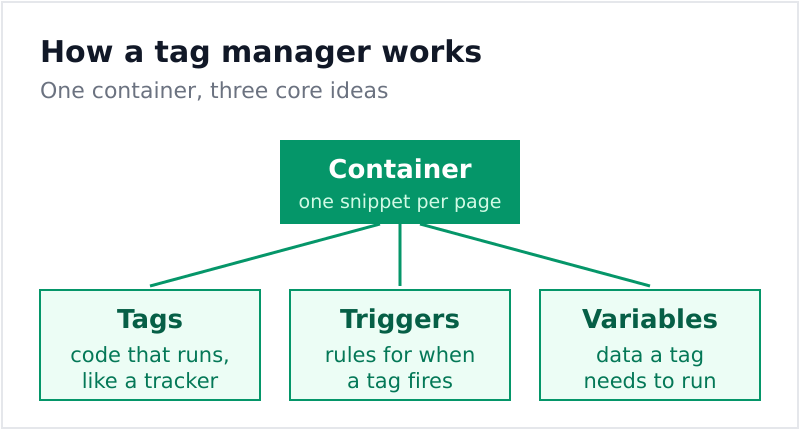
Most tag managers are built around three core ideas:
- Tags: The code snippets you want to run, like an analytics tracker or an ad pixel.
- Triggers: The rules that decide when a tag fires, such as on a page load or a button click.
- Variables: The pieces of information a tag needs, like a page URL or a product price.
You install one container snippet on every page. From then on, the tag manager handles the rest. When a visitor does something that matches a trigger, the right tag fires automatically. You never have to touch the site code again.
Why Use a Tag Manager?
The benefits become obvious the moment your tracking grows beyond one or two scripts. Here is what a tag manager gives you:
| Benefit | What it means for you |
|---|---|
| Speed | Add or change tags in minutes, not deploy cycles |
| Independence | Marketers update tracking without waiting on developers |
| Fewer errors | One tested setup instead of scattered snippets |
| Control | Turn tags on or off without editing the site |
| Cleaner code | Your pages stay light and easy to maintain |
That independence is the biggest win for most teams. Marketing can launch a new campaign tag the same afternoon, while developers stay focused on building the product.
Tag Manager and the Data Layer
A tag manager is far more powerful when it reads from a structured source of information about your page. That source is usually a data layer. Your website pushes details, like an order value or a page type, into the data layer, and the tag manager pulls exactly what it needs from there.
This pairing keeps everything tidy. Developers maintain the data layer, marketers manage the tags, and the two sides rarely step on each other. If you are building a serious tracking setup, learning both concepts together pays off quickly.
Things to Watch Out For
A tag manager is powerful, but it is not a license to add endless tags. Keep a few habits in mind:
- Audit regularly: Remove tags you no longer use so the container stays lean.
- Test before publishing: Most tag managers have a preview mode. Use it.
- Respect consent: Make sure tracking tags only fire when a visitor has agreed.
- Document your setup: Note what each tag does, so future you is not confused.
Consent is especially important. A tag manager makes it easy to control when tags fire, which helps you align with privacy rules. Our plain-English GDPR guide explains why that control matters. For a deeper technical reference, the official tag manager documentation is a good starting point.
The Bottom Line
A tag manager turns chaotic, hand-coded tracking into a calm, organized system. You install it once, then manage everything from one place, fire tags with simple rules, and let marketers move fast without breaking the site. For any website serious about tracking, it is one of the most useful tools you can adopt.

Alexander Vermeer
Web analytics specialist with over 8 years of experience implementing tracking solutions for businesses of all sizes. Passionate about helping companies make sense of their data without drowning in complexity. When not debugging GTM containers, you'll find me advocating for privacy-respecting analytics approaches.