What Is a Data Layer? A Plain-English Guide

Alexander Vermeer

If you have ever opened a tracking setup and seen the term data layer, you may have wondered what it actually does. It sounds technical, but the idea behind it is surprisingly simple. A data layer is one of the most useful concepts in modern web tracking, and understanding it makes everything else easier to manage.
Let’s walk through what a data layer is, why it exists, and how it fits into your wider analytics setup.
What Is a Data Layer?
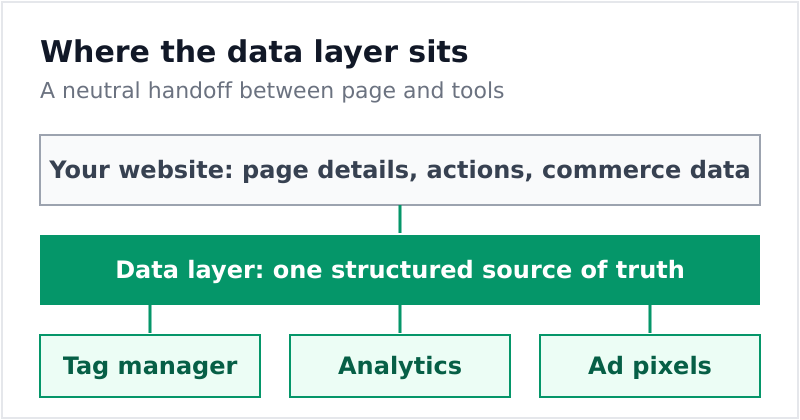
A data layer is a structured container that holds information about what is happening on a web page. It sits between your website and your tracking tools, and it stores details in a clean, organized format that those tools can read.
Think of it like a restaurant pass. The kitchen prepares everything in one place, and the waiters pick up exactly what they need from that pass. The data layer is the pass: your website puts information there, and your analytics tools collect whatever they need from it.
In technical terms, a data layer is usually a JavaScript object. Here is a simple example of what one might look like:
window.dataLayer = window.dataLayer || [];
window.dataLayer.push({
  'event': 'purchase',
  'orderValue': 49.99,
  'currency': 'USD',
  'productCategory': 'shoes'
});
Each time something important happens, your site pushes a small message into the data layer. Your tracking tools then listen for those messages and react.
Why a Data Layer Matters
Without a data layer, tracking tools have to dig through your page to find the information they need. They might read the price from a button, grab the product name from a heading, or scrape a value from somewhere in the HTML. This approach is fragile. If a developer changes the layout, your tracking breaks.
A data layer fixes this problem. It gives every tool a single, reliable source of truth. Here is why that matters:
- Stability: Your tracking does not break when the page design changes.
- Consistency: Every tool reads the same values, so your reports agree with each other.
- Cleaner setup: You define data once, then reuse it everywhere.
- Easier debugging: When something looks off, you can inspect the data layer directly.
For teams moving toward a more controlled pipeline, a data layer pairs naturally with server-side tracking, where consistency and clean data become even more important.
What Belongs in a Data Layer
You can store almost anything in a data layer, but the most useful items describe the page and the user’s actions. Common examples include:
| Type of data | Examples |
|---|---|
| Page details | Page type, category, language |
| User actions | Form submitted, video played, button clicked |
| Commerce data | Product name, price, order value, currency |
| Status flags | Logged in, newsletter subscriber, consent given |
One important rule: avoid putting sensitive personal information into the data layer. Names, email addresses, and similar details should stay out of it unless you have a clear reason and proper consent. Keeping personal data out helps you stay aligned with privacy rules.
How the Data Layer Fits Your Setup
The data layer usually works hand in hand with a tag manager. Your website populates the data layer, and the tag manager reads from it to fire the right tags at the right moment. This separation keeps your tracking flexible. Marketers can adjust tags without touching code, and developers only need to maintain the data layer.
It also plays well with structured campaign tracking. When you combine a data layer with UTM parameters, you get a complete view of where visitors came from and what they did once they arrived.
If you want to dig deeper into the technical side, the official Google data layer documentation is a solid reference.
Getting Started
You do not need a perfect data layer on day one. Start small. Define a few key events that matter to your business, push them into the data layer, and confirm your tools read them correctly. Over time, you can expand it to cover more actions.
The payoff is worth it. A well-built data layer turns messy, fragile tracking into something reliable and easy to maintain. Once it is in place, every new tool you add becomes simpler to connect, because the data is already waiting for it in a clean, predictable format.

Alexander Vermeer
Web analytics specialist with over 8 years of experience implementing tracking solutions for businesses of all sizes. Passionate about helping companies make sense of their data without drowning in complexity. When not debugging GTM containers, you'll find me advocating for privacy-respecting analytics approaches.