How Long Analytics Cookies Survive — and What Breaks When They Expire

Alexander Vermeer
You set an analytics cookie to expire in two years. Your reports behave as if it expires in a week. Both statements are true at the same time, and the gap between them explains a lot of confusing numbers.
The expiry date you write is a request, not a guarantee. Browsers have spent several years quietly overruling it, and Safari overrules it the hardest.
Here is what the caps are, which of your metrics they distort, and what to do about it. If the cookie is gone entirely rather than merely short, the companion piece on what you can and cannot measure without cookies picks up where this one stops.
The caps you are working against
Apple’s Intelligent Tracking Prevention publishes its rules, so these are not guesses. Three of them shape everyday analytics.
| How the cookie was set | Lifetime Safari allows |
|---|---|
Written by JavaScript via document.cookie | 7 days, whatever expiry you asked for |
| Written by JavaScript on a page reached through a decorated link | 24 hours |
| Set by an HTTP response from a CNAME-cloaked subdomain | 7 days |
| Any script-writeable storage, after no interaction with the site | Deleted after 7 days |
That second row catches people out, because a decorated link is exactly what your paid campaigns produce. WebKit describes it plainly: ITP detects link decoration and caps the expiry of cookies created in JavaScript on the landing page to 24 hours.
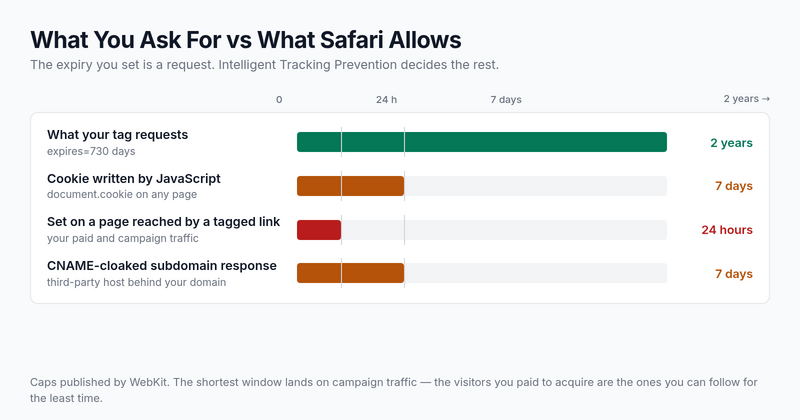
So the visitor who arrives from an ad with tracking parameters on the URL gets the shortest cookie of anyone. The traffic you paid for is the traffic you are worst at following.
What the other browsers do
Safari is the strict one, but it is not the only browser with an opinion. Chrome and Firefox both enforce a ceiling of their own. It is far more generous, and it still catches anyone who writes a two-year expiry date out of habit.
Chrome has capped Expires and Max-Age at 400 days since Chrome 104, which shipped in August 2022. A cookie asking for longer is not rejected: Google’s own note on the change says its expiration date “is set to 400 days instead”. Firefox enforces the same ceiling, and it got there in two moves: the Expires date was capped first, and the Max-Age attribute followed in Firefox 140, released in June 2025. The number comes from the cookie specification, which settled on a little over thirteen months so that a site you visit roughly once a year still recognizes you.
| Browser | Cookie written by JavaScript | Cookie set by your server in the HTTP response |
|---|---|---|
| Safari | 7 days, or 24 hours after a decorated link | No ITP cap — unless the subdomain is CNAME- or IP-cloaked, then 7 days |
| Chrome | 400 days, since Chrome 104 | 400 days |
| Firefox | 400 days (Max-Age capped from Firefox 140) | 400 days, plus purging of storage that belongs to classified trackers |
One line in that table is an absence rather than a rule. WebKit’s tracking prevention policy caps cookies written in JavaScript, and cookies coming back from a cloaked subdomain, but it publishes no general ceiling for an ordinary server-set cookie the way Chrome and Firefox do. Read that cell as “ITP does not cap it” rather than as permission to write a two-year expiry date and stop thinking about it.
Firefox adds a second mechanism that ignores your expiry date completely. Its cookie purging clears storage for domains it classifies as trackers when nobody has interacted with them, and interacting with a site grants a permission that lasts 45 days. Your own endpoint on your own domain normally sits outside that list, which is one more reason not to route measurement through a domain that sits inside it.
The practical reading: outside Safari the ceiling is high enough that most reports never touch it, but 400 days is still a hard stop for anyone quoting a two-year lookback. It also resets. Set the cookie again on the next visit and the clock starts over, which is why frequent visitors keep their identity and once-a-year visitors quietly lose it.
What breaks, in the order you will notice it
The caps do not produce an error. They produce numbers that look plausible and lean in one direction.
- New visitors are overcounted. A returning visitor whose cookie expired is indistinguishable from someone who has never been. Your new-versus-returning split drifts toward new, and looks like successful acquisition.
- Conversion paths get truncated. Anything with a consideration window longer than a week loses its beginning. The first touch is gone, so the last touch absorbs the credit.
- Paid channels look worse than they are. Combine the 24-hour cap with a research-heavy purchase and the ad that started the journey is invisible by the time the order arrives.
- Cohort and retention curves flatten. Week-two retention cannot be measured with a cookie that expired on day seven, so retention reads as worse than reality.
Notice the direction. Every one of these errors makes acquisition look better and retention look worse. That is a systematic bias, not random noise, and it is why the numbers rarely feel obviously broken.
How to tell whether it is happening to you
You do not need special tooling. Segment by browser and compare, because the caps apply to some browsers and not others.
- Split new-versus-returning by browser. If Safari shows a noticeably higher share of new visitors than Chrome for the same audience, you are watching cookies expire rather than watching different people.
- Compare time-to-conversion distributions. A hard drop-off just past the seven-day mark in one browser and not another is the cap, not behaviour.
- Check direct traffic share by browser. Lost attribution has to land somewhere, and it usually lands in direct.
- Look at your mobile split. Sites with heavy iPhone traffic feel this far more, since Safari is the default there.
Run this before changing anything. On a site where Safari is a small minority of traffic, the whole issue may be too small to spend engineering time on — and knowing that is worth an afternoon.
What genuinely helps
There is no setting that restores a two-year cookie. What is available is a set of trade-offs, and they differ a lot in effort.
| Approach | What it changes | Effort |
|---|---|---|
| Set the cookie server-side from your own domain | Escapes the JavaScript cap; still subject to the CNAME rule if the subdomain resolves elsewhere | Medium — needs a server component |
| Shorten the window you report on | Nothing technical, but a 7-day attribution window stops pretending to measure what it cannot | Low |
| Identify logged-in users by account | Cookie expiry stops mattering for the people who sign in | Low if accounts exist, impossible if they do not |
| Move to session or event counting | Removes the dependency on long-lived identity for the metrics that never needed it | Low — mostly a reporting decision |
That last row is the one teams underrate. Session and event counts never needed a visitor to be recognized weeks later, so the caps leave them intact — how sessions are counted without cookies walks through where the visit boundary comes from once the identifier is short-lived.
The one to be careful with is CNAME cloaking — pointing a subdomain of your own site at a third-party host so its cookies look first-party. Safari treats that case explicitly and caps those cookies at seven days too, so the work buys less than it appears to. If the line between the two kinds of cookie is fuzzy, the difference between first-party and third-party cookies sets out how the browser draws it.
Serving the tracking endpoint from infrastructure you actually control is a different matter, and it is the durable version of the same idea. That approach is covered in server-side tracking.
The reporting change that costs nothing
Before anyone builds anything, fix the claims. Most of the damage from cookie caps comes from reporting numbers as if they were complete.
- State the attribution window on the chart. “Conversions within 7 days of first touch” is honest and stays true.
- Report new-versus-returning as a trend, never as an absolute. The trend survives the bias; the absolute does not.
- Treat direct traffic as a residual bucket rather than a channel. It is partly people typing your URL and partly attribution that expired.
- Keep browser split visible in any report about users. It is the cheapest early warning you have.
None of that recovers a single lost visitor. It does stop the missing ones from being quietly attributed to the wrong place, which is the more expensive problem.
Common questions
Does this apply to Chrome as well?
Chrome caps expiry at 400 days rather than seven, so a week-long window is not something you will hit there. That gap is what makes the browser split such a useful diagnostic — if the two behaved identically, you would have nothing to compare against.
Will consent make the cookie last longer?
No. Consent and cookie lifetime are separate things. A visitor can accept everything and the browser will still cap what JavaScript writes — permission from the user is not permission from the browser. What consent does govern is whether you may set the cookie at all and how long you may keep what it collects, which is the subject of GDPR and how long you keep tracking data.
Is a first-party cookie automatically safe?
Not by itself. What matters is how it was set. A cookie on your own domain written by JavaScript is still capped, while the same cookie set in an HTTP response from your own server is treated differently.
Should we stop using UTM parameters to avoid the 24-hour cap?
No — you would lose the channel data entirely and gain very little. Campaign tagging remains worth it; just expect a shorter window on that traffic and say so in the report. How to tag properly is covered in UTM parameters explained.
Start with the measurement
Pull last month’s new-versus-returning split by browser. If Safari and Chrome disagree by more than a few points on the same audience, you have quantified the problem in about ten minutes.
That number is what decides whether this is worth engineering effort or just a footnote on a chart. Both are legitimate answers, and only one of them costs anything.

Alexander Vermeer
Web analytics specialist with over 8 years of experience implementing tracking solutions for businesses of all sizes. Passionate about helping companies make sense of their data without drowning in complexity. When not debugging GTM containers, you'll find me advocating for privacy-respecting analytics approaches.